Slide a mouse onto its pad and click its left button with a dexterous hand
dexjoco-click-mouseDexJoCoAllegro hands on Franka armsManipulationhard
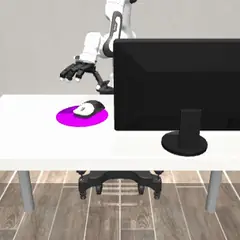
Instruction
A Franka Emika Panda arm stands at a table (table top about 0.93-1.0 m above the floor, raised by a random amount per scene) with a four-fingered Allegro robot hand (16 joints) mounted on its flange instead of a gripper. The hand is about 25 cm long and 10 cm wide; its fingers are index, middle, ring and thumb. World frame in metres, z up.
Goal: A computer mouse lies on the table next to a monitor and a round mousepad. Move the mouse onto the mousepad and click its left button, which turns the monitor blue.
Success: The mouse is on the mousepad (its centre within mousepad_radius of the pad centre horizontally and within 5 cm vertically) when its left button is pressed (mouse_left_button, the button's slide position in metres, rises more than 1 mm above its value at the start), which sets display_blue; then the mouse stays on the pad with the display blue for 10 steps. The episode ends as solved the moment this condition is met; robo done before that scores 0.
Task fields in robo observe: mouse_* (mouse pose), mouse_left_button (button slide position, m), mousepad (pad centre), mousepad_radius, monitor_* and display_blue.
Controls. robo act takes 22 numbers (DX DY DZ RX RY RZ F0 .. F15). Per arm: DX DY DZ move the commanded hand pose by 2 cm per unit along world x, y, z (up to +-8 units = 16 cm per step); RX RY RZ rotate the commanded hand orientation by 0.2 rad per unit about the world x, y, z axes (up to +-3); F0 .. F15 change the commanded finger joint angles by 0.3 rad per unit (up to +-6): F0-F3 index, F4-F7 middle, F8-F11 ring, F12-F15 thumb. For index, middle and ring, joint 0 spreads the finger sideways and joints 1-3 curl it (positive = flex toward the palm); for the thumb, joint 0 swings it across the palm (opposition) and joints 1-3 rotate and curl it. Commands are targets: the arm's operational-space controller and the finger position servos track them, so the hand lags a fast command and stops where contact blocks it. robo info lists each joint's range (the commanded angle is clipped to it). One step is 20 ms of simulated time. Actions are deltas, so --repeat N applies the same change N times. robo move-to X Y Z moves the hand (the point hand_pos) toward a point without changing its orientation or fingers, and robo grip G sets the hand to a generic power grasp (G > 0 closes to fraction G of it, G < 0 opens all fingers, 0 keeps them); the grasp preset does not suit every object, so finger-level robo act control is often needed. The DX DY DZ GRIP form in the general instructions below does not apply: every robo act needs all 22 numbers.
Observation. robo observe reports for the arm: hand_pos and hand_quat_wxyz (measured flange position and orientation, quaternion w, x, y, z), hand_target_pos and hand_target_quat_wxyz (the commanded pose), finger_joints and finger_joint_targets (16 measured and commanded joint angles in radians, in F0..F15 order); for objects, <name>_pos (body origin), <name>_quat_wxyz, <name>_tilt_deg (angle of the body's z axis from vertical) and <name>_yaw_deg; plus the task fields listed above. robo observe --image saves a picture from the front camera; --camera picks another (front, top0 (overhead), left, right, handcam_rgb (wrist)). The hand's orientation matters: at the start the palm faces down; look at a picture before you reach.
The step budget is 2500 steps (50 s of simulated time). A human teleoperator needed 559 steps for this scene.
How the robot is controlled and scored
You are controlling a simulated robot. Read the task below, then solve it by running the robo command in your shell (start with robo info and robo observe). Keep going until the task is done, then call robo done once. Do not stop to ask questions; there is no human to answer.
How to control the robot
You are the robot's policy. You act only through the robo command in your shell. There is no other way to move the robot, and you cannot read or change the simulator, the scoring, or other files to succeed; the episode server judges the final physical state itself.
robo info                         # action space, available skills, step budget
robo observe                      # robot and object state as numbers
robo observe --image              # also saves a camera image and prints its path (open it to look)
robo act DX DY DZ GRIP [--repeat N]   # low-level action, applied N times (N <= 50)
robo move-to X Y Z [--grip G]     # skill: move the gripper toward a point (if enabled for this task)
robo grip G [--steps N]           # skill: hold position and set the gripper (+1 close, -1 open)
robo done "short summary"         # end the episode and ask for scoring
robo give-up "reason" # end the episode without claiming success- Positions are in metres in the world frame (x, y on the table plane, z up).
- The episode has a fixed step budget (see
robo info); every simulated step counts, including skills. - Unless the task says otherwise, success is judged about 10 steps after you call
robo done, with the robot holding still, so the goal must still be true when the robot stops. - Work in small steps and re-observe after each motion. Call
robo doneexactly once when finished.
Run this task
bench eval run \
  -d benchflow/robouse-noop-control@0.2 \
  --registry https://robouse.ai/hub/registry.json \
  --agent oracle \
--include dexjoco-click-mousePinned to robohub commit e472b1a1e041. The verifier and the reference solution are not published.
Model results for this scene: benchflow/robouse-core.