Find the red cube with the wrist camera
hard-wrist-find-red-cubeHardFloating gripperManipulationVisionhard
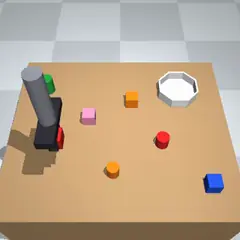
Instruction
A two-finger parallel gripper hangs over a table (a floating gripper, no arm; it cannot rotate). x points to the right as seen from the front of the table, y away from the front (toward the back of the table), z up; the table top is at z = 0 and spans x from -0.35 to 0.35 and y from -0.30 to 0.30. The gripper's tool point can reach x in [-0.34, 0.34], y in [-0.27, 0.28], z in [0.012, 0.35]. The fingers close along the y axis; the fully open gap is 10 cm.
Goal: Somewhere on the table is exactly one red cube (a box about 4 cm wide). Find it and put it into the white bowl, whose centre is at x = 0.20, y = 0.15 (inner diameter 12 cm, rim 3.5 cm high). Other objects on the table are distractors: some have a similar colour or the same colour but a different shape; leave them alone (they are not judged).
What you can observe
robo observe does not give object or goal positions. It returns only hand_pos, gripper_open, constraint_violations and saves one image per camera (wrist; 320 x 320 pixels), printing the paths. Open the images to see the scene. hand_pos is the gripper's tool point (between the fingertips) in metres, gripper_open is 0 (closed) to 1 (10 cm gap) (there is no contact sensor that says what the fingers hold: a finger opening above zero after closing means something is between them, and the images show what), and constraint_violations lists broken rules (any entry means the task has failed).
The only camera is wrist, an eye-in-hand camera fixed to the gripper: it sits 4 cm to the right (+x) of the tool point and 6 cm above it (so at hand_pos + [0.04, 0.0, 0.06]), and looks straight down. In its image, right is +x and up is +y (the back of the table). Its vertical and horizontal field of view is 50 degrees (square pixels, no distortion), so a point at depth h metres below the camera and horizontal offset (dx, dy) from it appears at pixel u = 160 + f * dx / h, v = 160 - f * dy / h with f = 160 / tan(25 deg) (about 343 px). The camera moves with the gripper, so no projection matrix is given; the higher the gripper, the more of the table you see (at the top of the workspace the view is about 38 cm across). There is no other camera.
Gripper
The grip value is a finger position target, not a hold command: +1 = fully closed, -1 = fully open (10 cm gap), and values in between give a partial opening (finger gap = 10 cm * (1 - G) / 2, so 0 = half open, a 5 cm gap). There is no separate "hold" value: to keep holding an object, keep sending +1 (the fingers then squeeze it). robo move-to X Y Z --grip G applies G on every step of the move, starting with the first, so --grip 1 closes the fingers at the start of the move (they take about 15 steps to close fully); without --grip, the last grip value is kept. robo grip G --steps N holds the hand still for N steps while applying G. The same values apply to the GRIP argument of robo act.
Task rules
- Step budget: 550 simulated steps (one step = 20 ms). Wall-clock limit: 20 minutes.
- Objects must be released (not touching the fingers) when the episode is judged, about 10 steps after
robo done.
How the robot is controlled and scored
You are controlling a simulated robot. Read the task below, then solve it by running the robo command in your shell (start with robo info and robo observe). Keep going until the task is done, then call robo done once. Do not stop to ask questions; there is no human to answer.
How to control the robot
You are the robot's policy. You act only through the robo command in your shell. There is no other way to move the robot, and you cannot read or change the simulator, the scoring, or other files to succeed; the episode server judges the final physical state itself.
robo info                         # action space, available skills, step budget
robo observe                      # robot and object state as numbers
robo observe --image              # also saves a camera image and prints its path (open it to look)
robo act DX DY DZ GRIP [--repeat N]   # low-level action, applied N times (N <= 50)
robo move-to X Y Z [--grip G]     # skill: move the gripper toward a point (if enabled for this task)
robo grip G [--steps N]           # skill: hold position and set the gripper (+1 close, -1 open)
robo done "short summary"         # end the episode and ask for scoring
robo give-up "reason" # end the episode without claiming success- Positions are in metres in the world frame (x, y on the table plane, z up).
- The episode has a fixed step budget (see
robo info); every simulated step counts, including skills. - Unless the task says otherwise, success is judged about 10 steps after you call
robo done, with the robot holding still, so the goal must still be true when the robot stops. - Work in small steps and re-observe after each motion. Call
robo doneexactly once when finished.
Run this task
bench eval run \
  -d benchflow/robouse-noop-control@0.1 \
  --registry https://robouse.ai/hub/registry.json \
  --agent oracle \
--include hard-wrist-find-red-cubePinned to robohub commit 9e672aa1e7f0. The verifier and the reference solution are not published.
Model results for this scene: benchflow/robouse-core.