Read each vial's hidden underside label with an upward camera, then pack it by colour (dual Panda)
menagerie-panda-fragile-kitMenagerieDual Franka PandaManipulationVisionhard
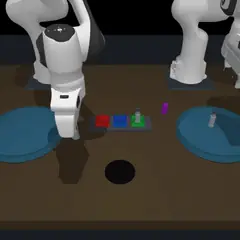
Instruction
Two Franka Emika Panda arms (7 joints each, with a parallel two-finger hand whose fingers open to 8 cm; the hand is about 20 cm wide along the finger axis) are mounted side by side at the back edge of a 1.6 m x 0.94 m desk, both reaching forward toward you. The "left" arm is the one at negative x (on the left in the front camera view), the "right" arm the one at positive x. This is a MuJoCo physics simulation with the MuJoCo Menagerie robot models: every object is a free rigid body that moves only through contact and friction (nothing is attached or teleported), so a loose grip, a fast swing or a collision can drop or knock things over. World frame in metres: +x to the right, +y toward the robots (the back of the desk), +z up; the desk top is z = 0.
Goal: Three identical glass vials (vial_0 .. vial_2, 7 cm tall, 2.4 cm base, a 2 cm body up to 4.6 cm, then a thin neck and a cap) stand in the bowls: two in the left bowl, one in the right. Each has a coloured label (red, blue or green) on its underside, hidden against the bowl floor; nothing else tells them apart. A black inspection station in front of the board has a camera looking straight up (--camera inspect). Show each vial's underside to that camera, read its label, and pack the vial upright in the compartment of the same colour on the kit tray (red, blue, green from left to right). Two violet ampoules behind the tray must not be disturbed.
Success: Every vial stands in the compartment matching its hidden label (base centre within 10 mm of the compartment centre, resting on its floor within 4 mm of z = 0.0102, tilted at most 10 degrees, released, at rest); every vial was held over the inspection station at some point (base centre within 3 cm of the station horizontally and between 4 and 25 cm above the desk, tilted less than 20 degrees); and neither ampoule moved more than 5 mm or tilted more than 10 degrees at any time. Success is judged by the episode server from the physical state after you call robo done and the robots have held still for about 10 steps (0.5 s). "Released" means neither arm touches the object; "at rest" means it moves slower than 1 cm/s.
Goal fields in robo observe: red_compartment_center, blue_compartment_center, green_compartment_center (floor centres; each compartment is 4.4 cm square inside with 1.8 cm walls), compartment_ and inspection_station (the camera position on the desk).
Controls. One arm moves at a time. robo act ARM DX DY DZ GRIP first selects the arm (ARM -1 = left, +1 = right, 0 = keep the currently selected arm; the other arm holds still), then moves that arm's commanded gripper target by DX, DY, DZ times 2 cm per step along world x, y, z (each in [-1, 1], so 0.25 = 5 mm); GRIP 0 keeps the fingers as they are, any positive value closes them, and a negative value -f opens them to fraction f of full width (-1 fully open, -0.4 = 40 % open). One step is 50 ms. robo move-to X Y Z and robo grip G drive the currently selected arm (select one with e.g. robo act -1 0 0 0 0). Inverse kinematics turns the target into joint commands; the grippers always point straight down.
Observation. robo observe reports, for each arm (prefixed left_ / right_; in this task the selected arm's fields also appear without prefix, with selected_arm), hand_pos (the measured point between the fingertips), hand_target (where the arm is being driven; it can run up to 5 cm ahead of the hand, which then catches up), gripper_open (0 closed .. 1 fully open) and touching (task objects in contact with that arm); for every task object <name>_pos (the centre of the object's base, where it touches the surface below), <name>_tilt_deg (tilt from upright) and <name>_yaw_deg; plus the goal fields listed above. robo observe --image saves a picture from the front camera (--camera overhead looks straight down with +y at the top of the picture; --camera overview is a far corner view).
Observation mode: vision. robo observe returns the listed state fields and saves one image per camera (workspace, the front view, and inspect, looking up from the inspection station) and prints their paths; open them to look. The labels appear only in images. robo info gives each camera's 3x4 projection matrix.
The step budget is 2500 steps (125 s of simulated time).
How the robot is controlled and scored
You are controlling a simulated robot. Read the task below, then solve it by running the robo command in your shell (start with robo info and robo observe). Keep going until the task is done, then call robo done once. Do not stop to ask questions; there is no human to answer.
How to control the robot
You are the robot's policy. You act only through the robo command in your shell. There is no other way to move the robot, and you cannot read or change the simulator, the scoring, or other files to succeed; the episode server judges the final physical state itself.
robo info                         # action space, available skills, step budget
robo observe                      # robot and object state as numbers
robo observe --image              # also saves a camera image and prints its path (open it to look)
robo act DX DY DZ GRIP [--repeat N]   # low-level action, applied N times (N <= 50)
robo move-to X Y Z [--grip G]     # skill: move the gripper toward a point (if enabled for this task)
robo grip G [--steps N]           # skill: hold position and set the gripper (+1 close, -1 open)
robo done "short summary"         # end the episode and ask for scoring
robo give-up "reason" # end the episode without claiming success- Positions are in metres in the world frame (x, y on the table plane, z up).
- The episode has a fixed step budget (see
robo info); every simulated step counts, including skills. - Unless the task says otherwise, success is judged about 10 steps after you call
robo done, with the robot holding still, so the goal must still be true when the robot stops. - Work in small steps and re-observe after each motion. Call
robo doneexactly once when finished.
Run this task
bench eval run \
  -d benchflow/robouse-noop-control@0.1 \
  --registry https://robouse.ai/hub/registry.json \
  --agent oracle \
--include menagerie-panda-fragile-kitPinned to robohub commit 9e672aa1e7f0. The verifier and the reference solution are not published.
Model results for this scene: benchflow/robouse-core.