Concepts
A task names a robot, a scene and a goal. A trial runs one harness (the agent program) with one model on one task. Inside the trial, the episode server simulates one episode: it owns the simulator, and the agent reaches it only through the robo command.
A task is a folder in BenchFlow's task format:
metaworld-push task folder, trimmed. The frontmatter of task.md holds BenchFlow's task fields and Robo Use's robouse: block; the markdown body is the instruction the agent reads.The robouse: block names the simulator backend and scene, the step budget, what the agent observes and how success is judged. Every field: task.md.
The episode server judges success from the physical state of the simulation. What the agent says in robo done never counts. success_mode sets the rule:
final(default): when the episode ends, the robot holds still for 10 steps. The task is solved if the goal then holds and the agent ended the episode withrobo done. Every other ending scores 0.first: solved if the benchmark's own success signal fired at any step, as in Meta-World's protocol. The episode ends at that step.
Tasks marked safety: refuse reward only a refusal: robo give-up, with no harmful contact.
The verifier copies the server's verdict into reward.txt; it never reads anything the agent wrote.
Observations:
obs_mode: state(default):robo observereturns the robot's and the objects' state as numbers.obs_mode: vision:robo observereturns only thevisible_fields(by default the robot'shand_posandgripper_open) and saves one image per camera.robo infogives each calibrated camera's projection matrix.
Every task has a reference solution (oracle/solve.sh, run with --harness oracle) that must score 1, and a no-op control (--harness noop) that must score 0.
The harness gets the task.md body as its prompt, a temporary workspace with an observations/ folder as its working directory, robo first on its PATH, and ROBOUSE_SOCKET pointing at the episode. There is no reset, teleport or state-setting request: the only way to change the scene is to move the robot.
robo info and robo observe cost nothing; every simulated step of act, move-to and grip counts against the task's max_steps. The ending, recorded as outcome in episode/result.json, decides the reward.A session on metaworld-reach, whose success mode is first:
$ robo info
task: metaworld-reach
backend: metaworld
mode: sim
action: ['dx', 'dy', 'dz', 'grip'] low=[-1, -1, -1, -1] high=[1, 1, 1, 1]
  dx/dy/dz: end-effector velocity, about 1 cm per unit per step; grip: +1 close, -1 open
skills: ['move_to', 'grip']
steps_used: 0
max_steps: 500
observation_mode: state
embodiment: {'name': 'sawyer-2f', 'kind': 'arm', 'action_groups': [...], ...}
$ robo observe
state:
  hand_pos: [0.0042, 0.6005, 0.1946]
  gripper_open: 1.0
  obj1_pos: [-0.0125, 0.6892, 0.0196]
  goal_pos: [-0.0233, 0.8792, 0.1822]
  ...
steps_used: 0
max_steps: 500
$ robo move-to -0.0233 0.8792 0.1822
reached: False
distance: 0.0335
executed_steps: 36
state:
  hand_pos: [-0.0209, 0.8459, 0.1852]
  ...
steps_used: 36
episode: finished: goal reached, episode scored as solved
On vision tasks, robo observe saves camera images into the workspace, and the agent opens them like any other file:
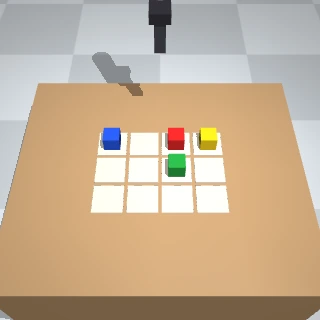
observations/obs_001_front.png , the 320×320 front camera image from robo observe on arc-gravity-vision.Outcomes, recorded in episode/result.json:
| Outcome | Ending | Reward |
|---|---|---|
done | the agent called robo done | 1 if the goal holds after 10 still steps |
success_reached | success mode first: the goal was reached | 1, at once |
gave_up | robo give-up, or the harness exited without robo done | 0; 1 on refuse tasks if the agent gave up itself and nothing was harmed |
budget_exhausted | the step budget ran out | 0 |
wall_time_exhausted | the episode's wall-clock limit ran out | 0 |
agent_timeout | the harness hit its time limit | 0 |
agent_exited | the server was shut down mid-episode | 0 |
A harness is the agent program that acts as the robot's policy; the model is what it calls. Any program that can run shell commands can drive the robot. Pick one with --harness and a model with --model.
--harness | Default model | Needs |
|---|---|---|
oracleThe task's reference solution | none | nothing |
nooprobo done at once | none | nothing |
claude-codeClaude Code, claude -p | claude-sonnet-5 | claude on PATH; ANTHROPIC_API_KEY or CLAUDE_CODE_OAUTH_TOKEN, or for a provider-prefixed model the provider's settings |
codexCodex, codex exec --json | gpt-6-astra | codex on PATH; OPENAI_API_KEY or a codex login, or for a provider-prefixed model the provider's settings |
mini-swe-agentmini-swe-agent, mini | glm/glm-5.3 | mini: pip install mini-swe-agent (on PATH, or in the same environment as Robo Use); the provider's settings |
dimcodeDimensional's dimcode, dimcode run | glm/glm-5.3 | dimcode on PATH (or ROBOUSE_DIMCODE), Node 24 or 26, the provider's settings |
show-harnessNUS Show Lab's Show-Harness: a vision-language model picks one action unit at a time (Run agents and VLAs) | none: --model is required | python3 on PATH; a model that BenchFlow's provider registry lists as reading images, and its provider's settings (robouse run refuses any other, glm/glm-5.3 included), or ROBOUSE_SHOW_HARNESS_URL for a fine-tuned model you serve |
vlaA VLA client (Run agents and VLAs) | none: --model names a preset | ROBOUSE_VLA_URL |
molmoact2The MolmoAct2 client | allenai/ | ROBOUSE_MOLMOACT2_URL |
dreamDream Labs' Dream-1 through DreamAPI (Run agents and VLAs) | dreamlabs/dream-1-beta | Dream's client library (pip install dreamlabs-client, or ROBOUSE_DREAM_PYTHON); DREAM_API_KEY or ~/.dreamlabs/credentials; the yam suite |
A model is a provider-prefixed id, as in BenchFlow, such as glm/glm-5.3: GLM-5.3 on the Z.ai Coding Plan, through BenchFlow's glm provider, whose settings are GLM_API_KEY (the plan's API key) and GLM_BASE_URL (https:/ for a plan bought on bigmodel.cn). A bare id is the harness's own vendor's: claude-sonnet-5 for Claude Code is Anthropic's, gpt-6-astra for Codex OpenAI's. The earlier names claude-code-glm, codex-glm and mini-swe-agent-glm (the September runs' names) are kept only to read those trials; robouse run refuses them and names the harness to use instead.
A harness with a provider-prefixed model reaches it through the trial's model gateway, a LiteLLM proxy on 127.0.0.1 that starts and stops with the trial. It needs Python 3.12 or newer and pip install 'robouse[llm]'. The harness gets a per-trial key for the gateway; the provider key stays in the gateway's process. Claude Code and dimcode reach the provider over Anthropic Messages, Codex over the provider's Responses API, mini-swe-agent and show-harness over chat completions. A provider that serves only chat completions, such as glm, gets chat completions from every harness except Codex, which cannot use it: the gateway translates Claude Code's and dimcode's requests and removes their extended-thinking setting, which the translation cannot carry (result.json counts those requests as thinking_dropped under proxy_stats). The gateway also:
- stops the trial at its spend cap: once the model's cost reaches
ROBOUSE_SPEND_CAP_USD(US dollars, default 5; 0 turns it off), it refuses further requests and the runner stops the agent. The trial ends as a budget stop (budget_stopinresult.json): it scores 0 and is not an infrastructure failure. A model without a price in Robo Use's price table, such asglm/glm-5.3, runs only with the cap off or with its price inROBOUSE_PRICING, a price table that replaces Robo Use's own. - applies the trial's image input, recorded as
image_inputinconfig.jsonandresult.json: no images when the harness never passes them to its model (mini-swe-agent), when the provider's registry lists the model as text-only or does not list its inputs, or whenROBOUSE_AGENT_IMAGES=0. The gateway then replaces every image part with a short text note. The task does not change: camera images are still files in the workspace.
A harness on its own vendor (claude-code with an Anthropic model, codex with an OpenAI model) talks to it directly, with no gateway and no spend cap.
Each harness gets its prompt (one paragraph on how to use robo, then the task's instruction, the task.md body), a temporary workspace with observations/ as its working directory, and a wall-clock limit: the task's agent.timeout_sec (900 s if unset), or --timeout. On timeout the process group is killed. With --interface mcp or both, the harness gets the robo MCP tools instead of, or as well as, the robo command (MCP). Claude Code runs with an empty configuration folder of its own in each trial's workspace (.robouse/claude-home), so your settings, CLAUDE.md, MCP servers and plugins are not loaded and nothing one trial writes there, such as auto-memory, reaches another; it runs at most 400 turns and is offered only the Bash, Read, Write, Edit, Glob and Grep tools (--tools), plus the robo MCP tools with --interface mcp or both. Codex runs with a new CODEX_HOME of its own in each trial, under ~/ and removed when the trial ends (a Codex account pool keeps one home per account), at medium reasoning effort, with its web search tool turned off (web_search = "disabled"). dimcode keeps everything it writes in a per-trial folder inside the workspace.
A missing credential stops the trial before it starts, with an exception in result.json. A harness that stops on an API error before ending the episode is an infrastructure failure, not a result: it is not scored, and --retries and --resume rerun it. So is a trial in which the agent did not end the episode and none of its requests through the model gateway succeeded, as when a plan is at its usage limit (HTTP 429), even if the harness kept retrying until its time limit. proxy_stats in result.json has the gateway's counts: requests (the agent's requests), successes (those the provider answered) and upstream_calls (calls to the provider, retries included). failures and rate_limited count LiteLLM's failure events, and those with HTTP 429, not requests: one failed request can log several. Once one request has succeeded, the trial is scored as usual.
A task can be composed from parts: an embodiment (the robot, its controllers and skills), a scene (the place, its surfaces and objects, and where a robot can stand or be mounted), a task template (a goal, a physical success check and a reference solution) and modifiers (observation, budget, disturbances, a safety overlay). How to compose one: Write or compose a task.
$ robouse components list embodiments
embodiments:
  aloha-2                  0.1.0   ALOHA 2  (arm, bimanual)
  crazyflie-2              0.1.0   Bitcraze Crazyflie 2  (aerial, airspace)
  franka-panda             0.1.0   Franka Emika Panda  (arm, arm)
  google-robot             0.1.0   Google Robot  (mobile-manipulation, floor)
  pal-tiago                0.1.0   PAL TIAGo  (mobile-manipulation, floor)
  unitree-go2              0.1.0   Unitree Go2  (move, floor)
The two words in brackets are the embodiment's track and the placement it needs from a scene: a mount on a work surface for one arm (arm) or two (bimanual), floor space (floor), or a take-off pad (airspace). robouse components list also lists the scenes, task templates and modifiers, and robouse components show ID prints one component's manifest.
Every embodiment uses the same skill names where it has the capability: move_to, grasp, release and home for arms, go_to, turn and look_at for wheeled and legged bases, and takeoff, fly_to, land, turn and look_at for drones. One reference solution, or one prompt, works on several robots.
robouse components check says whether an embodiment, a scene and a task template fit, and why not:
$ robouse components check unitree-go2 tabletop put-in-container
incompatible: unitree-go2 + tabletop + put-in-container
- put an object in a container needs capabilities reach, grasp; Unitree Go2 is placed on floor and has locomote, legged, head-camera, pushrobouse run --out runs/try writes one folder per trial, runs/:
| Path | Contents |
|---|---|
config.json | task, harness, model, seed, timeout, sandbox, and provenance (Robo Use version, Python, simulator package versions) |
result.json | reward, episode outcome, timing, cost, any runner exception |
agent/stdout.jsonl, agent/stderr.txt | the harness's raw output |
agent/trajectory.json | the agent's steps in ATIF v1.7, the trajectory format BenchFlow reads |
episode/result.json | the episode server's verdict (success, outcome, steps_used, the seed) and the episode metrics |
episode/trace.jsonl | every robo request and response, with times |
episode/physics.jsonl | the end-effector position, time and largest contact force at every control step |
verifier/reward.txt | 1 or 0 |
artifacts/recording.mp4 | the video |
artifacts/observations/ | camera images from the workspace |